
Footage and agentic editing
Why RAW Video Shows Up Blank on a Mac, and How to See It Again
RAW video is the best footage you shoot and the hardest to look at. What RAW really is, why log looks grey, which formats need what, and how to keep a RAW archive you can actually browse.
You shot the sunrise in RAW because it was the shot of the trip. Six months later you plug in the drive, open the folder and get a wall of identical document icons. No thumbnails. Quick Look shows a spinning wheel, or a grey square, or nothing. The footage recorded at the highest quality your camera can manage is the hardest thing on the drive to look at.
That isn't your Mac being broken. It's what RAW is. Here's what's going on, why log footage looks washed out even when it does play, and how to keep years of RAW shoots browsable without converting all of it.
The short answer. A RAW video file holds sensor data, not a finished picture, and something has to develop every frame before you can see it. macOS develops a few RAW formats itself. The rest need the camera maker's software, an editor that supports the format, or a plug-in. For an archive, the fix is a library that develops RAW on the fly, shows log footage with a normal look, and keeps every take searchable whether the drive is plugged in or not.
What RAW video actually is
A camera sensor doesn't see color. Each photosite measures brightness under a red, green or blue filter, in a mosaic. A normal video file is what you get after the camera has turned that mosaic into full-color pixels, set white balance and exposure, applied its color science and compressed the result. Those decisions are baked in.
A RAW file stops before all that. It keeps the mosaic, plus your settings as notes: ISO, white balance, tint, the look you monitored with. That's why colorists love it. You can change white balance after the shoot as if you'd changed it on set, pull back highlights a normal file has already clipped, and grade from the cleanest possible start.
The catch sits in the middle column. Every app that shows a RAW frame has to develop it first: debayer the mosaic, apply the settings, map it to a picture. That takes the format's own decoder and a fair amount of GPU. An app that lacks either shows you nothing.
Why RAW footage looks flat and grey, even when it plays
Many cinema cameras record with a log curve as their default look. Log squeezes the camera's full range of brightness into the file so the colorist has room to work. Played straight, it looks like the left half of this:
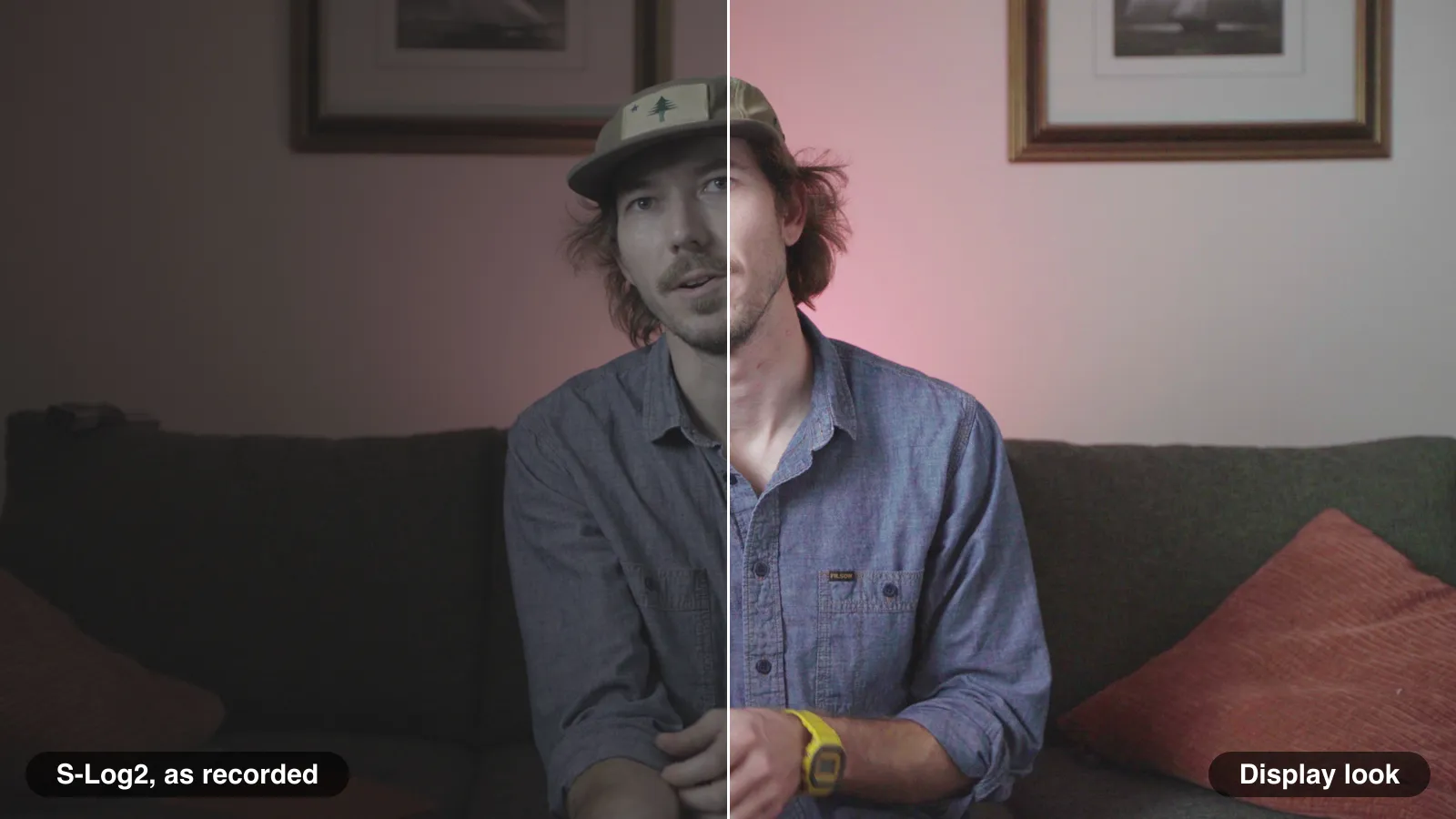
Log is a recording choice, not a fault. The problem comes when you're trying to choose a shot. A grid of grey, low-contrast frames all look alike, and the sunset you remember doesn't look like a sunset. To pick fast, you need the display look: the clip developed with its own ISO, white balance and tone mapping, for a normal screen. On set, that's what the monitor's LUT shows. Months later, it's what your library should show too.
The RAW formats you'll meet
Each camera family has its own RAW format, and support differs by app. A rough map:
| Format | Files | Recorded by | Reads it natively |
|---|---|---|---|
| Apple ProRes RAW | .mov | iPhone 17 Pro and Pro Max (Final Cut Camera 2.0, Blackmagic Camera), DJI's cinema drones, external recorders from Atomos and others fed by mirrorless cameras | macOS itself (since Catalina), Final Cut Pro, DaVinci Resolve, Premiere Pro |
| Blackmagic RAW | .braw | Blackmagic cinema cameras | DaVinci Resolve, Blackmagic RAW Player |
| Canon Cinema RAW Light | .crm | Canon Cinema EOS cameras and several EOS R bodies, such as the EOS R5 Mark II and EOS R1 | Canon's Cinema RAW Development, DaVinci Resolve, Premiere Pro |
| Nikon N-RAW | .NEV | Nikon Z9, Z8, Z6III, Z5II and ZR | DaVinci Resolve and a growing list of editors |
| ARRIRAW | .ari, .mxf | ARRI ALEXA cameras | ARRI Reference Tool, DaVinci Resolve |
| REDCODE RAW | .R3D | RED cameras such as V-RAPTOR and KOMODO; the Nikon ZR records a variant, R3D NE | REDCINE-X PRO, DaVinci Resolve, Premiere Pro, Final Cut Pro with RED's plug-in |
Other cinema cameras record their own RAW formats too, and the same pattern holds: the camera maker's tools and the big editors read them first, everything else later.
Why your Mac shows blank icons
Finder thumbnails and Quick Look use the decoders macOS has installed. ProRes RAW is Apple's own format, so the system can decode it. For most other RAW formats, macOS has nothing to develop a frame with, so Finder falls back to a generic document icon.
Apple added a way out in macOS Sequoia: Media Extensions, which let a developer add a format reader and decoder that any app built to use them can call on. Uptake has been slow. Apple said in 2024 that a Blackmagic RAW extension was coming; as of May 2026 it hadn't shipped, and the extension that exists comes from a third party, BRAW Toolbox, which needs macOS Tahoe. Canon's RAW plugin for Final Cut Pro is reported by users to add Quick Look previews for its files. For most formats, it's still one plug-in per format, per app.
If you install one, check what it covers. A plug-in that lets Final Cut Pro read a format doesn't always give you Finder thumbnails, and a Finder preview doesn't make the footage searchable.
How working crews cope today
Nobody with a deadline waits for Finder. Crews usually do one of three things:
- Make proxies or dailies. Transcode every RAW clip to a lightweight ProRes or H.264 copy, often with a viewing LUT burned in. It works everywhere and costs drive space and hours of encoding. The proxies drift: renamed, left on a different drive, not made for the shoot nobody expected to need again.
- Open the camera maker's player. Accurate, free and slow for browsing. One format per app, one folder at a time, and nothing searches across shoots.
- Import into the editor. Resolve and Premiere read most RAW formats well. A project is built for one edit, though, not for ten years of shoots, and a project file is not a catalog you can search when the drive is in a drawer.
All three work. None of them answers the question you're actually asking when you open an old drive: where's that shot, and what does it look like?
What to ask of any app that says it supports RAW video
"Supports RAW" can mean anything from "imports the file name" to "develops it in real time". Six questions sort it out:
| Ask | Why it matters |
|---|---|
| Does it show a picture, or just a file name? | A thumbnail grid is how you find a shot. An icon grid is a file list. |
| Does log footage look normal? | A grid of grey frames is barely better than icons. You want the display look, with the clip's own settings. |
| Does a long take play as one clip? | Many cameras split long takes into several numbered files. Browsing them as fragments is how takes get lost. |
| Does it play smoothly, at full quality when paused? | Developing 6K RAW is heavy. Good players lower the resolution while playing and show every pixel when you stop. |
| Can you search inside the footage? | By what was said, or by what's in the picture, across every shoot at once, not just within one project. |
| Does it need proxies first? | If it does, you're back to encoding, storage and drift. |
How Grain Photo handles RAW footage
We make Grain Photo, a Mac library for every photo and video across your drives, so here's our answer to those six questions. Grain imports RAW clips from cinema cameras as video, next to your stills and phone footage, and plays them with its own engine on the Mac's GPU. No proxies, no conversion: the originals stay where they are.
- A picture for every clip. Where the camera wrote its own thumbnail, that appears straight away; Grain develops its own posters and hover frames from there.
- Log footage with its display look. A clip recorded in log is shown developed for a normal screen, keeping its own ISO, white balance and tone mapping.
- Split takes as one clip. A long take the camera split across numbered files shows once, plays straight across the join, and steps frame by frame either side of it.
- Smooth playback, full quality when paused. While playing, Grain develops at the resolution the window needs; paused, stepped and scrubbed frames are full quality. On an M1 Max Mac, a 6K take shows its first frame in about a quarter of a second.
- Searchable like everything else. RAW clips are transcribed and described like any other video, so you can search by what was said or by what's in the picture, across every drive. The camera's metadata comes along: camera, lens, ISO, shutter and capture date.
- Still there when the drive isn't. Grain keeps previews in its catalog, so a RAW shoot stays browsable and searchable after you unplug the drive.
RED's R3D footage is developed by Grain's own decoder. Formats macOS develops itself, such as ProRes RAW, play through the same engine, and so does any format covered by a Media Extension you've turned on. There's a 7-day free trial if you want to try it on a card of your own.
Quick answers
Can Finder preview RAW video? ProRes RAW is the easy case, because macOS includes its decoder. Other formats need a plug-in or Media Extension from the camera maker or a third party, and coverage varies by format and macOS version.
Why does my RAW footage look grey? It was probably recorded in log, which keeps the widest range for grading. It needs a display transform or a LUT to look normal. The data isn't damaged.
Do I need proxies to browse RAW video? Not if your library or player develops RAW in real time. Proxies are still useful for editing on a laptop, or for sending to someone without the right software.
Is RAW worth the storage? For footage you'll grade hard, mixed light and high-contrast scenes, usually yes. For interviews under controlled light, a high-quality ProRes or log file often grades just as well at a fraction of the size. Shoot RAW where it earns its space, and keep it browsable either way.
RED, REDCODE, R3D, KOMODO and V-RAPTOR are trademarks or registered trademarks of Red.com, LLC. Apple, ProRes, Final Cut Pro, Mac, macOS, Finder, Quick Look and iPhone are trademarks of Apple Inc., registered in the U.S. and other countries. Blackmagic RAW and DaVinci Resolve are trademarks of Blackmagic Design Pty. Ltd. Canon, Cinema RAW Light and EOS are trademarks of Canon Inc. Nikon and N-RAW are trademarks of Nikon Corporation. ARRI, ARRIRAW and ALEXA are trademarks of Arnold & Richter Cine Technik GmbH & Co. Betriebs KG. Sony and S-Log are trademarks of Sony Group Corporation. Adobe and Premiere Pro are trademarks of Adobe. DJI and Atomos are trademarks of their respective owners. These names are used only to identify the formats and products discussed. Grain Photo is independent and is not affiliated with, sponsored or endorsed by any of these companies.