
Grain vs. Photo Mechanic
Are you choosing keepers from today’s shoot, or trying to find a photo from five years ago? Those jobs often get bundled into a search for “Photo Mechanic alternatives,” but they call for different tools. Grain is worth trying when finding the old shot is the part slowing you down.
Find the person, photograph or spoken passage you need. Grain connects archive search to your existing editing and agent workflows.
Why Grain fits
You need photo, people and video search across shoots and drives, then a way to gather and use those results in your next project.
Specific Photo Mechanic workflows to compare
Check Photo Mechanic’s simultaneous multi-card ingest, metadata applied during ingest and caption code replacement if your assignments depend on those steps.
Photos, people and video. One searchable library.
- Find people in your photos. Name a face once, review the matches, then choose a person from search to browse their photos. Beta.
- Search footage and dialogue. Find videos by description. Every recording is transcribed on your Mac, so you can search what was said and jump to the moment. Beta.
- Find duplicates. Use duplicate detection to identify repeated files in your library.
- Put the results to work. Gather selections in collections, open originals in your editor, or connect compatible agents through Grain’s MCP server and CLI.
The differences that matter
People and Clips are in beta in Grain Photo 1.3.
| Your workflow | Grain Photo for Mac | Photo Mechanic |
|---|---|---|
| Primary workflow | Browse, search and organize photos and videos across drives. | Ingest, review, caption, organize and deliver a shoot. [1] |
| Search information | Find untagged media by description; refine with metadata filters. | File and metadata workflows. Photo Mechanic Plus, its catalog edition, is no longer sold. [2] |
| Work with originals | Open originals in your editor without moving your files. | Browse files and automate copying and metadata during ingest. [1] |
| Purchase options | $49 once. Seven-day free trial. | Subscription and perpetual options are both listed. [2] |
A second life for the work you already shot
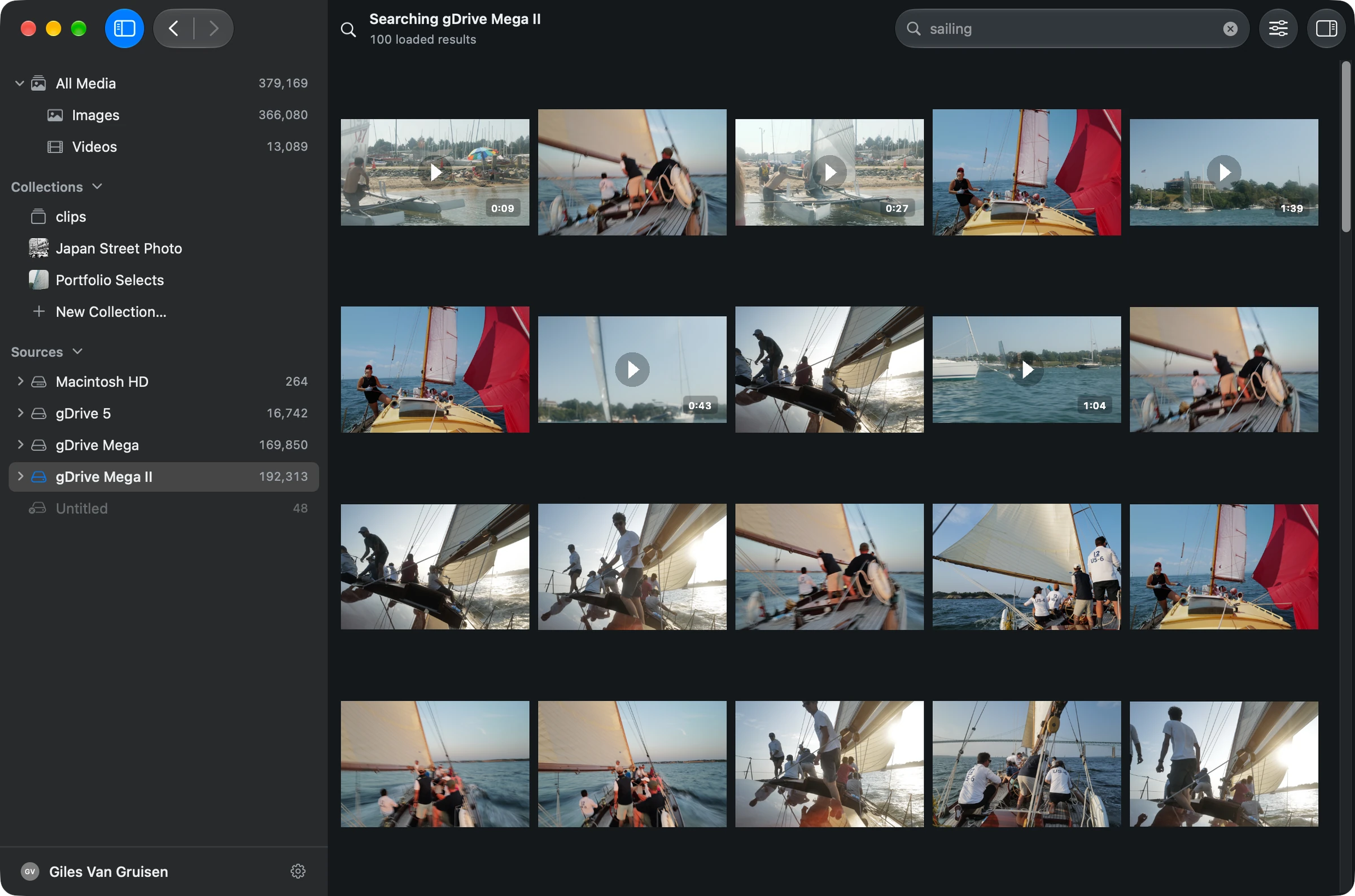
A client asks for a coastal image. You remember a sailboat in fog, but the files are named by camera sequence and the shoot could be on any of several drives. That is a useful Grain search: start with the visual detail, then narrow by source or date.
After Grain has analyzed the relevant folders, you can search them together without adding the description as a keyword to every image. Preview the candidates and use Show in Finder to return to an original.
Keep Photo Mechanic where it earns its place
Photo Mechanic’s card ingest, captions, code replacement and delivery tools serve a different part of a working photographer’s day. Grain is not a drop-in replacement for that workflow. Photo Mechanic Plus, its catalog edition, is no longer sold.
You can evaluate Grain alongside an existing ingest and editing setup. There is no need to abandon a dependable tool just to add another way to find your archive. [1]
Try it on a folder you know
- Choose an older shoot whose filenames tell you little about the pictures.
- Let Grain analyze it, then search for a scene or subject rather than a filename.
- Check that finding and revealing the original saves you a step in your existing workflow.
See the walkthrough: get started, search by description, or search an external drive.
Before you choose
Is Grain a cheaper Photo Mechanic replacement?
Grain costs $49 once, but price alone is the wrong comparison if you need Photo Mechanic’s ingest and professional metadata tools. Try Grain for archive search; evaluate your culling and delivery requirements separately.
Do I have to move or re-import my photos?
Grain scans media in the folders you choose. It does not need a new folder layout or a copy of the archive. Allow time for the initial scan and analysis before judging search results.
Put your archive to work.
Find the people, photos and footage for your next project. Bring the results into your editing and agent workflows.
7-day trial · Apple silicon · macOS 13 or later
Built-in search runs on your Mac. Optional connections to external AI assistants have their own data handling.
Sources & scope
Written by Grain. Competitor details checked against official documentation on . This is a workflow comparison, not an independent review or a speed or accuracy benchmark. Features and plans can change.
People and Clips are in beta in Grain Photo for Mac. Automatic transcription runs on macOS 26; the rest of Grain runs on macOS 13 or later.